

Quick answer
Why Is Traditional Manufacturing Sales Onboarding Falling Short For Field Reps?
Standard manufacturing onboarding can fall short because spreadsheets and CRM tables hide geography (and where matters). With over six out of ten sales leaders considering their onboarding ineffective, new reps take nearly a year to reach full productivity, driving up turnover costs and delaying revenue. Broad industry research shows that roughly 62% of sales organizations view their current onboarding process as ineffective. On average, a new hire undergoes 10 weeks of formal training and requires 11.2 months to achieve full productivity and deliver a tangible ROI.
When an onboarding cycle falters and a rep leaves, replacing them can cost a company nearly $100,000 in recruitment and lost opportunity costs. Yet the core breakdown in manufacturing field onboarding rarely stems from a lack of product knowledge or sales training. Instead, the friction begins on day one when new reps are handed flat spreadsheets or tabular CRM reports and expected to manually decipher their geographic territory.
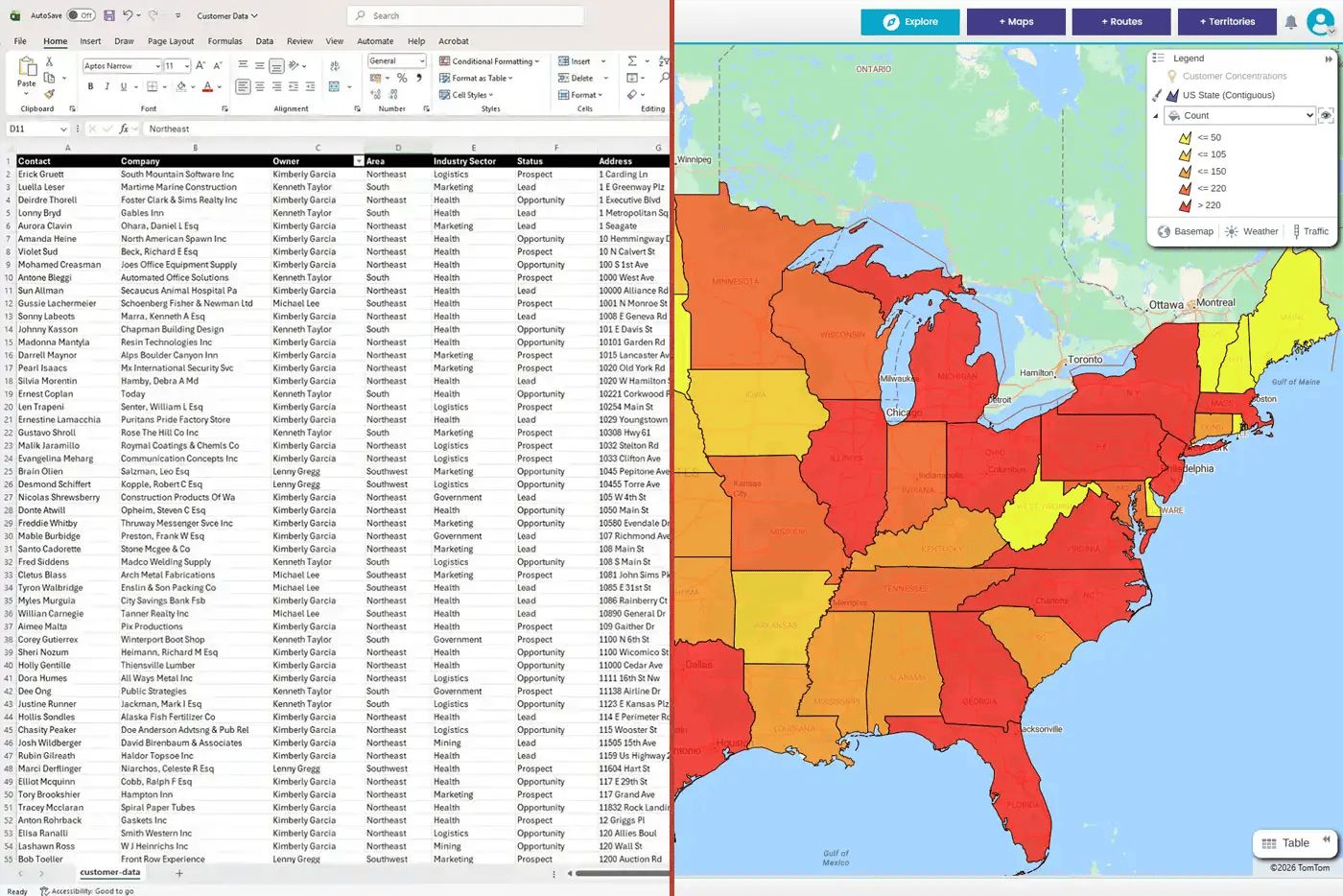
Without a map, reps spend their crucial early months guessing travel routes, driving haphazardly between distant accounts, and overlooking nearby high-value prospects. This excessive windshield time drains rep momentum, leads to missed initial quotas, and extends the ramp period far longer than necessary. Replacing static spreadsheets with enterprise manufacturing mapping software eliminates this friction by giving new hires immediate visual clarity over their assigned patch.
Location intelligence compresses sales rep ramp time by converting address rows into interactive visual maps. By giving new hires instant clarity on account locations, customer density, and efficient travel paths, spatial software helps sales reps master their territory up to 67% faster.
When a new field sales rep starts, their biggest hurdle isn't understanding product specs, it is understanding where their actual revenue opportunities physically live. Sifting through hundreds of address rows in a spreadsheet forces reps to construct mental maps from scratch, an inefficient process that stalls early momentum.
Deploying a dedicated location intelligence platform eliminates this mental friction by instantly rendering flat account lists into intuitive visual layers. New sales hires can immediately see account clusters, differentiate active accounts from cold leads using color-coded pin filtering, and identify high-priority regional corridors on day one.
This visual clarity translates directly into accelerated field productivity. For instance, global manufacturing organizations like Henkel have compressed sales onboarding ramp times by up to 67% by equipping new reps with interactive territory maps instead of static spreadsheets. When new hires see their patch visually, they spend far less time planning and far more time conducting high-value buyer meetings.
The 30-60-90 day location intelligence framework structures field sales onboarding into three visual phases:
This framework systematically evolves rep metrics from initial learning milestones into sustainable quota attainment.
Basic mapping software simply drops static pins on a map to show where accounts are located. Location intelligence layers your critical data, such as account revenue, equipment counts, and drive-time logic, onto geographic maps, showing sales reps where to go, who to prioritize, and how to optimize their time.
For a new field sales hire, basic mapping drops hundreds of identical pins across a state. Location intelligence color-codes those pins by account value, filters them by visit urgency, and calculates real-world driving friction. This transforms raw location data into actionable daily decisions, giving reps the operational clarity needed to ramp up faster.
Transitioning a new field sales rep from onboarding to full quota productivity requires a structured, phase-based approach. Rather than overwhelming hires with tabular reports or sending them into the field without strategic direction, location intelligence provides a visual roadmap for territory dominance.
|
Onboarding Phase |
Operational Focus |
Platform Workflow |
Primary KPI Tracked Rep Ramp Time |
|---|---|---|---|
|
Days 1–30: Visualize |
Territory Intelligence & Patch Integration |
Sync CRM data to visualize boundaries and overlay existing account pins. |
Territory analysis complete; top 20 target accounts identified. |
|
Days 31–60: Aanlyze |
Workload Prioritization & Buyer Engagement |
Apply heatmaps and weighted metrics to isolate high-value account clusters. |
Qualified meetings booked in target accounts; initial pipeline generated. |
|
Days 61–90: Execute |
Weekly Route Planning & Dynamic Field Adaptation |
Build weekly schedules around anchor accounts and dynamically re-optimize routes for urgent field requests. |
Ramped quota attainment; minimized windshield time; higher meeting velocity. |
Sales maps empower new reps to build stronger distributor partnerships by turning internal market data into shared territory intelligence. By visually identifying high-potential end-user accounts within a distributor's region, reps and channel partners can jointly target and win new market share.
In many manufacturing sectors, field sales reps don't sell directly to end consumers, they rely on trusted distributor networks and channel partners who own the local customer relationships. Rather than leaving distributors to guess where the next growth opportunity lies, location intelligence gives new sales hires an augmented layer of market insight to share with channel partners.
By mapping internal market data and product usage trends, new reps can highlight specific end-user facilities within a distributor's territory that have high demand for their product category, but aren't currently buying their brand. Equipped with these visual maps, new hires can sit down with distributor sales teams to co-develop targeted growth plans. Reps transform into consultative partners, helping distributor teams prioritize high-value prospects, coordinate joint field calls, and win competitive accounts together.
Gradual workload balancing prevents new rep burnout by assigning reduced initial capacity, such as 75% of a standard workload, during early onboarding. eSpatial enables sales operations to scale account loads gradually over 3 to 6 months, ensuring a manageable ramp-up before realigning to full territory capacity. Traditional territory assignment hands new reps a full-capacity workload on day one, forcing them to manage dense customer bases before they have even mastered their product line or geography.
With eSpatial's weighted workload balancing, sales leaders can set custom capacity targets—such as capping a new hire at 75% of an average workload for their first 3 to 6 months. This gives new reps the operational breathing room to learn their territory, build initial relationships, and achieve early wins without feeling overwhelmed.
Once the rep completes their onboarding phase and gains confidence in the field, sales operations can realign territory boundaries and scale them to 100% capacity in just a few clicks. Gradually scaling account loads creates a predictable, manageable ramp-up period while protecting rep morale and retention.
Multi-stop route optimization reduces field sales windshield time by up to 30% by calculating real-world drive times and traffic patterns. Having a mobile routing guide at their fingertips eliminates the steep geographic learning curve for new reps, turning travel friction into productive selling hours.
Every field sales plan looks perfect on paper, until a new rep actually hits the road. When a hire is new to a territory, unpredictable drive times, rush-hour bottlenecks, and unfamiliar regional geography quickly derail even the best-planned schedules. Without a tool to guide them, new reps endure a steep learning curve, wasting crucial early weeks sitting in traffic and driving back and forth across town.
eSpatial's multi-stop route planning puts an intelligent spatial guide directly at their fingertips, automatically accounting for real-world drive-time friction and clustering meetings into smooth, efficient corridors. By helping reps structure weekly itineraries around key anchor accounts and launching turn-by-turn directions in Google Maps or Waze, the software takes the guesswork out of daily travel. Cutting windshield time by up to 30% bypasses the painful trial-and-error period, giving new hires the time and confidence to focus on meeting buyers.
You integrate territory mapping software with Salesforce CRM through a native, bi-directional data sync. This keeps interactive spatial maps and live CRM account records continually synchronized, eliminating manual spreadsheet uploads while maintaining enterprise ISO-27001 data security. A major barrier to technology adoption during sales onboarding is administrative friction. If new hires have to manually export and clean CSV spreadsheets every time an account status or contact changes, map data quickly becomes outdated and unreliable.
Native, bi-directional integration with Salesforce eliminates this manual overhead by creating a seamless bridge between CRM data and interactive spatial maps. Field updates, new prospect additions, and territory boundary changes recorded in eSpatial sync automatically back to live Salesforce records in real time. This continuous data loop ensures that sales leaders, sales operations, and ramping reps always work from a single source of truth. Backed by enterprise-grade ISO-27001 security compliance, sales organizations can deploy location intelligence across their field teams with zero friction and complete data peace of mind.

