

Quick answer
What is Route Optimization for Field Sales Teams?
Field sales route optimization is the strategic process of sequencing customer visits based on account priority, appointment windows, representative workload, and geography. Unlike basic GPS tools that only identify the shortest path between two coordinates, sales route optimization balances business goals, customer availability, and driving efficiency to maximize face-to-face selling time.
Standard consumer navigation apps are built to answer a simple question: "What is the quickest way to get to a single destination?" Field sales operations, however, are significantly more complex than navigating from point A to point B. When planning multi-stop sales days, geographic distance is only one part of the equation. Representatives must balance hard constraints like locked customer appointment windows with strategic variables such as account potential, required call frequencies, and meeting durations.
Route optimization transforms this planning phase by automatically calculating the most cost-efficient travel sequence around your team's real-world sales priorities. Instead of forcing sellers to waste hours manually mapping spreadsheets, intelligent routing gives representatives a clear, executable schedule that minimizes windshield time and maximizes revenue opportunities.
How Does Route Optimization Increase
Sales Revenue and Lower Costs?
Field sales route optimization drives measurable bottom-line growth by cutting travel drive times by up to 16% and reducing total mileage by 47%. Fitting just one extra sales call per day per representative unlocks $800,000 in incremental annual revenue and generates $819,000 in direct travel expense savings for a 200-representative field team.
Optimizing field sales routes is far more than an operational convenience—it is a high-impact driver of corporate profitability. When sales leaders eliminate redundant windshield time, representatives reclaim lost hours and redirect that energy toward revenue-generating customer conversations.
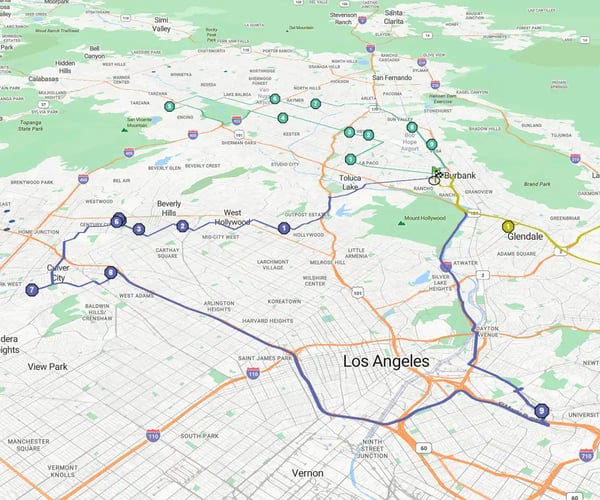
Consider a real-world baseline route: a typical representative drives 6 hours and 30 minutes to cover 122.79 miles across a busy territory. By applying intelligent route optimization, that same itinerary drops to 5 hours and 28 minutes and reduces driving distance to just 64.39 miles. That single optimization delivers a 16% reduction in drive time and a 47% reduction in total mileage.
What is the Financial Impact of
Adding One Sales Call Per Day?
Reclaiming over an hour of travel time every day gives field representatives the bandwidth to fit one extra sales call into their daily schedule. When scaled across a sales organization, the compounding financial gains are substantial:
- 1 extra call per day = 5 additional buyer touchpoints per week per representative.
- 5 extra calls per week = 200 incremental customer visits per representative each year.
- Applying a modest 20% conversion rate yields 1 additional closed deal per representative every week.
- At an average deal size of $1,000, each representative generates $40,000 in new annual revenue without adding staff.
- For a team of 200 field sales reps, this single workflow change unlocks $800,000 in new annual revenue.
At the same time, CFOs gain immediate travel expense relief. Saving an average of 35 miles per representative per day across 200 selling days—reimbursed at standard federal rates of 58.5 cents per mile—unlocks $819,000 in direct expense savings every year.
|
ROI Metric |
Unoptimized Baseline Route |
Optimized eSpatial Route |
Total Impact across 200 Field Reps |
|---|---|---|---|
|
Daily Drive Time |
6 hours, 30 minutes |
5 hours, 28 minutes |
16% reduction in travel time |
|
Daily Territory Distance |
122.79 miles |
64.39 miles |
47% reduction in total mileage |
|
Customer Visits |
Baseline call volume |
+1 sales call per day |
+40,000 incremental visits/year |
|
Revenue Impact ($1k avg deal) |
Baseline sales quota |
+1 deal per week per rep |
+$800,000 in new annual revenue |
|
Travel Expense Savings |
Standard mileage claims |
-35 miles saved per day |
+$819,000 annual expense reduction |
Want To See The Exact Financial Breakdown For Your Team Size?
How Do You Balance Territory Workload Before Optimizing Daily Routes?
Territory workload balancing compares account density, required call frequencies, and drive times across representatives to equalize workload before routing. Balancing macro territories prevents rep burnout, balances market coverage, and ensures high-potential customer accounts receive appropriate visit frequency across all sales regions.
Why Must Macro-Territory Alignment Precede Micro-Route Planning?
Even the most advanced route optimization software cannot fix an inherently broken territory map. If sales territories are unbalanced, some representatives will spend hours driving long distances while others easily cover dense account clusters.
Unbalanced travel loads lead to uneven team productivity, skewed sales performance metrics, and rep burnout. By assessing territory workloads first, sales operations leaders can align geographic boundaries based on total effort required rather than raw geographic size.
Using a territory workload table in eSpatial, you can compare effort metrics across your entire team to identify over- or underworked territories:
Call Frequencies
The required number of scheduled touchpoints per account tier.
Call Durations
Realistic time allocations for strategic versus routine visits.
Travel Time
Total driving time calculated automatically across assigned territories.
Equalizing workload before building daily schedules ensures every seller has a fair, executable territory and a clear path to achieving quota.
Are Unbalanced Territories Dragging Down Your Team's Travel Efficiency?
How Do You Build an Effective Field
Sales Schedule in 4 Steps?
Building an effective field sales schedule requires setting anchor stops for fixed customer appointments, prioritizing accounts by sales potential, clustering nearby visits geographically, and adding buffer time. Incorporating time for parking, meeting prep, and admin work prevents schedule breakdown when meetings run over.
Creating a daily field route is not just about connecting dots on a map. To protect selling time and keep representatives productive, field schedules must reflect the real-world rhythm of sales work.
What is the 4-Tier Field Stop Hierarchy?
Here is a practical 4-step workflow to turn high-priority account lists into reliable daily routes:
Categorize Accounts Using the 4-Tier Hierarchy
Before arranging visits geographically, organize your daily stops into four distinct operational tiers:
- Fixed Stops: Locked customer appointments and time-sensitive meetings that must occur at specific times
- Priority Flexible Stops: High-value accounts and active sales opportunities that must be visited during the day, even if exact arrival times shift
- Fill-in Stops: Nearby accounts with lower potential that reps can visit if extra time opens up
- Drop-First Stops: Low-priority or routine check-ins that can be removed from the itinerary if travel or earlier meetings run over
Build Around Anchor Stops and Geographic Clusters
Select one or two fixed appointments or high-value accounts to serve as anchor stops for the day. Build the rest of your travel sequence around these anchors by clustering nearby flexible visits. Grouping accounts geographically eliminates cross-territory driving and backtracking.
Insert Realistic Friction and Travel Buffers
Routes fail when they assume every meeting ends on time and parking is effortless. Build buffer time into each stop to account for parking, walking into facilities, pre-meeting account prep, and post-meeting notes. Factoring in realistic visit durations keeps the day on track.
Adapt Dynamically on the Fly
When an unexpected delay or last-minute cancellation occurs, representatives need the flexibility to adapt without abandoning their entire plan. Modern route optimization software automatically recalculates the remaining journey around updated customer availability, ensuring reps make the most of every hour in the field.
Ready To Build Flexible, High-Impact Routes For Your Field Team?
No credit card required
How Does Field Route Optimization
Software Sync with Enterprise CRMs?
Field route optimization software syncs bidirectionally with enterprise CRMs by pulling account addresses, opportunity stages, and contact details directly into the mapping platform. Representatives log visit outcomes and schedule follow-ups through mobile apps, instantly updating CRM records without administrative delay.
A route plan is only as powerful as the CRM data behind it. When field mapping software operates in isolation, representatives are forced to jump between applications, re-enter addresses, and manually copy visit notes after a long day on the road.
Bidirectional integration connects your route optimization engine directly to your central CRM system. Live account locations, deal pipeline stages, and contact details automatically populate eSpatial's mapping interface, while field visit records flow back into the CRM instantly.
|
Software Layer |
Core Function in Field Operations |
Data Flow & Sync Direction |
|---|---|---|
|
Enterprise CRM |
Stores core customer data, deal values, and interaction history. |
Feeds account addresses and deal stages to eSpatial. |
|
eSpatial GIS Engine |
Balances territories, filters accounts, and optimizes multi-stop routes. |
Outputs optimized travel sequences and territory maps. |
|
Mobile Field App |
Delivers turn-by-turn directions, account context, and instant logging. |
Syncs visit notes, outcomes, and tasks back to CRM. |
How Do Mobile Field Tools Prevent Administrative Friction?
Sellers waste hours each week hunting for context in parking lots before walking into client meetings. Mobile field routing tools put key CRM details, such as last order history, open opportunities, and recent support tickets, directly at the representative's fingertips.

After a meeting ends, representatives can log visit notes, update deal stages, and schedule follow-up actions in less than a minute. Capturing details while they are fresh keeps account records clean and eliminates the weekend admin backlog.
Furthermore, route data equips sales leaders to coach team performance rather than police daily activities. Instead of micromanaging schedules, managers use travel patterns and coverage data to identify under-served markets, adjust territory boundaries, and refine sales targets.

Frequently Asked Questions
Standard GPS navigation simply finds the shortest path between point A and point B. Field sales route optimization is a broader strategic process that sequences multiple stops based on account priority, required call frequencies, meeting durations, rep travel constraints, and customer appointment availability windows.
By reducing driving time by 16% and total mileage by 47%, route optimization delivers immediate financial gains. For a team of 200 field representatives saving 35 miles per day, it reduces travel expenses by $819,000 annually while unlocking $800,000 in incremental sales revenue by fitting in one extra customer call per day.
If sales territories are geographically unbalanced, representatives in spread-out regions will spend excessive time driving regardless of how well their daily routes are arranged. Balancing territory workloads based on call frequencies, meeting durations, and travel times ensures equal sales opportunity and workload distribution across the entire team.
eSpatial factors in fixed appointment availability windows during the route planning process. The optimization engine locks in these mandatory meeting times first and automatically sequences flexible or opportunistic stops around them to keep travel efficient.
Route optimization software connects bidirectionally with CRMs like Salesforce. Account locations and opportunity data automatically import into eSpatial, while field updates, visit logs, and follow-up tasks recorded on mobile devices sync back to the CRM in real time.