


Sales territories rarely stay balanced for long. New customers are acquired, high-performing representatives take on more accounts, markets expand, and businesses reorganize. Over time, territories that once looked fair can become uneven, leaving some reps overloaded while others have capacity to spare. The result is inefficient customer coverage, longer travel times, missed opportunities, and ultimately lost revenue.
Sales territory management software helps businesses solve these challenges by bringing structure to how territories are designed, planned, and managed. But not every platform approaches the problem the same way. The market has effectively split into three distinct disciplines, and most organizations end up patching together tools to cover all three.
1. Territory Design
Territory design is about defining geographic boundaries and deciding which customers belong to which sales representative. Modern territory design tools use factors such as account value, customer density, drive time, and representative workload to create balanced territories that improve coverage while reducing unnecessary travel. This is the "where" question: where should the lines be drawn, and who sits on which side of them?
2. Territory Planning
Territory planning looks beyond geography to the commercial side of sales operations. It focuses on questions such as how many representatives each territory requires, how quotas should be allocated, whether capacity is sufficient for future growth, and how territory changes will affect revenue performance. These tools are often closely linked to sales planning and compensation processes.
3. Territory Execution
Once territories have been created, they need to work in the real world. Territory execution focuses on helping sales and field teams operate efficiently through route optimization, customer visit planning, activity tracking, and ongoing territory adjustments as customer data changes.
Because these three disciplines solve different problems, many organizations rely on two or even three separate platforms. A planning solution may determine quotas and capacity; a business mapping platform may design and balance territories, and a mobile application may optimize daily routes for field representatives. Stitching these together works, but it also means territory decisions get made across disconnected systems, with no single place to model changes before committing them.
eSpatial occupies a distinctive position. Rather than competing with quota planning it offers a fully integrated, data visualization tool, with territory and route optimization. Through scenario modeling, metric-based balancing, and optional Salesforce integration, eSpatial lets sales operations teams test different territory structures, compare outcomes, and see the impact of a change before it's rolled out. Instead of designing territories in one tool and discovering the consequences in another, teams can move from design to scenario to decision in one place, with far more confidence before committing to organizational change.
|
Criteria |
eSpatial Design-First |
Maptive Mapping-First |
Salesforce Maps Design-first |
CaptivateIQ Planning-First |
Badger Maps / SPOTIO Execution-First |
|---|---|---|---|---|---|
|
Primary strength |
Business mapping, data visualization, route optimization, territory management and scenario modeling |
Business mapping, visualization, automated territory optimization, routing |
Salesforce-native mapping, territory planning, routing |
Territory, quota, capacity and compensation planning |
Mobile field execution, routing, territory visibility and activity tracking |
|
Salesforce integration |
Direct two-way Salesforce integration(optional add-on) |
Salesforce data handled through export/upload; API available on Pro+ |
First-party Salesforce product; works directly with Salesforce data |
Direct Salesforce integration for planning and compensation data |
Badger: real-time two-way CRM integration included; SPOTIO: native bidirectional Salesforce sync |
|
Territory capabilities |
Territory design and optimization, multi-metric balancing, predictive what-if scenarios, up to 6 hierarchy levels on Advanced |
Automated territory optimization across account density, revenue potential, workload and drive time; scenario testing |
Territory design and assignment, optimization, workload balancing and drivetime/road-network modeling via Territory Planning |
Geo-carving, account assignment, territory hierarchies, quota and capacity modeling, scenario modeling |
Badger: territory creation, optimization, weighted metrics and scenario planning through Badger Align; SPOTIO: visual territory creation, hierarchies, assignments and coverage management |
|
Route optimization |
Up to 50 stops in Daily Routes and 300 stops in a multi-week schedule in the Territory Manager |
Up to 73 stops per optimized route |
Routing and scheduling in Maps; more advanced logic and longer planning horizons in Maps Advanced |
Not a core capability |
Badger: up to 120 stops; SPOTIO: built-in route optimization, up to 150 stops |
|
Pricing (2026) |
$1,495/year for Mapping Pro; Professional Territory Manager $7,995/year; Advanced $14,995/year (All include 3 Users) |
$250/45 days; Pro $1,250/year; Team $2,500/year |
Maps $75/user/month; Maps Advanced $125/user/month, billed annually; Territory Planning/Sales Planning may require additional licensing |
Custom/quote-based enterprise pricing |
Badger: $58/user/month annually; Badger Align from $20/month per territory. SPOTIO: custom user-based pricing |
|
G2 rating |
4.3/5 (38 reviews) |
4.7/5 (35 reviews) |
4.3/5 (500+ reviews) |
4.7/5 (3,487 reviews) |
Badger: 4.7/5 (340 reviews); SPOTIO: 4.5/5 (400 reviews) |
|
Support quality (G2 rating) |
Dedicated success/support positioning 9.0/10 |
Phone, chat and email on all plans; vendor reports 9.7/10 |
Standard, Premier and Signature Salesforce Success plans available |
Enterprise customer success Rating N/A |
Email, chat & knowledge base Badger: 9.5/10 / SPOTIO: 8.9/10 |
|
Implementation timeline |
Create maps in minutes; vendor offers full onboarding and setup assistance |
Hours to days; Self-service and fast to start; mapping can begin within minutes after upload |
Days to weeks, depending on familiarity with the platform |
Weeks to months (complex) |
Hours to days for Badger: Under 4 weeks for SPOTIO |
|
Best for |
Businesses that need business mapping, visualization, territory design, balancing, routing and scenario modeling. |
Teams prioritizing flexible business mapping, visualization, demographics, and routing |
Salesforce-standardized teams wanting mapping and territory planning inside the Salesforce ecosystem |
Mid-market and enterprise RevOps teams connecting territories with quotas, capacity and compensation |
Field sales organizations where route efficiency, rep activity and mobile execution are the priority |
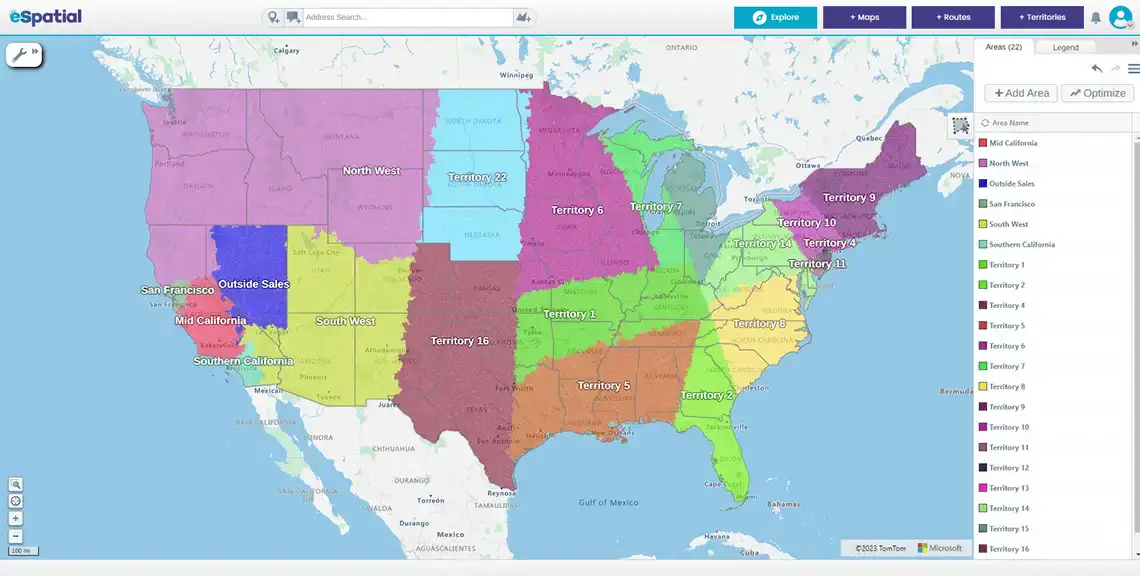
eSpatial is a territory design specialist, helping sales operations build, test, and optimize territories before rolling them out to the business. Rather than covering quota planning or mobile field execution, the platform focuses on creating balanced territories based on account value, workload, customer density, drive time, and other operational metrics.

Salesforce Integration
That specialization shows up most clearly in how eSpatial connects with two-way synchronization with Salesforce and lets teams design territories using live CRM data instead of manual spreadsheet exports (available as an optional add-on).
Teams can build account-based, geographic or hybrid territories, compare multiple alignment scenarios, and evaluate the impact of changes before publishing them to the wider organization.
Advanced Tier
For organizations with more complex sales structures, the Advanced Territory Manager plan supports up to six levels of organizational hierarchy, automated territory optimization, and predictive "what-if" scenario modeling. These capabilities let sales operations leaders test different territory structures, acquisitions, or market expansions before committing to changes in production.
eSpatial also launched their new AI Territory Assistant (Beta) on 1st September.
TerritoryAssist is an AI-powered mapping assistant in eSpatial Territory Manager. It helps you analyze your territories by offering summaries on key territory metrics, such as coverage, workload, balancing values, and workability, whilst guiding you through suggested next steps and actions.
Best For
eSpatial works best for organizations with 50 to 1,000 sales representatives planning ongoing territory realignments or evaluating multiple structures before assigning accounts and changing sales coverage.
When to Pair With a Planning Tool
If quota planning, capacity planning, or sales compensation management are also on the table, easily export your alignments to a planning platform such as CaptivateIQ to cover the broader revenue planning process.
Pricing
Pricing starts at $1,495 (for 3 users) per year for Mapping Pro, with the Professional Territory Manager plan at $7,995 (for 3 users) per year and Advanced Territory Manager at $14,995 (for 3 users) per year, with Salesforce integration available as an optional add-on for teams that need it.
G2 Rating
eSpatial holds a 4.3/5 rating from 38 G2 reviews, with a 9.0/10 support score. Reviewers frequently highlight the platform's ease of use, responsive customer support, and ability to simplify territory creation and balancing, particularly for teams moving off manual mapping or spreadsheet-based processes.
Maptive takes a mapping-first approach to sales territories, built around visualization, demographic analysis, and route efficiency rather than deep Salesforce-native design. It converts spreadsheet or CRM data into interactive maps, letting sales operations teams build heat maps, territory boundaries, and drive-time zones without needing a dedicated analyst.
Its standout feature is automated territory creation, which Maptive markets as AI-powered. Teams can generate balanced territories from zip codes or custom boundaries, then adjust them using spreadsheet data or built-in demographic variables. Route optimization is another strength, supporting up to 73 stops per trip, ahead of most competing platforms in this category.
Entry Price
Pricing starts as low as $250 for short-term or trial access, with individual plans at $1,250 per year and team plans at $2,500 per year, making it the most affordable option among the major territory tools compared here.
Best For
Maptive works best for teams that prioritize route efficiency, demographic analysis, and fast visual territory building over deep CRM-native design. It suits organizations that need to see their data on a map quickly, whether for sales coverage, service zones, or market analysis, and that value flexibility across CRM platforms over tight Salesforce integration.
CRM Flexibility
Maptive connects with Salesforce, HubSpot, Zoho, Pipedrive, and Keap, giving it more CRM flexibility than tools built exclusively for one ecosystem. Data from any of these platforms can be imported and mapped directly.
Data Capacity
The platform handles well over 100,000 location points without performance issues, useful for larger territories or dense customer bases.
Maptive vs. eSpatial
Where Maptive and eSpatial diverge comes down to priorities. Maptive wins on route optimization, and price point, while eSpatial wins on territory design capabilities and scenario modeling for teams that need to test territory changes before committing to them. Organizations focused on structured territory design tend to lean toward eSpatial, while teams prioritizing mapping flexibility and route planning across multiple CRM platforms tend to lean toward Maptive.
G2 Rating
Maptive holds a 4.7/5 rating from 35 G2 reviews, with a 9.7/10 support score, reviewers frequently citing ease of use and responsive customer support.
CaptivateIQ takes a planning-to-pay approach that few competitors attempt. Rather than treating territory design, quota setting, and compensation as separate workflows, it manages all three from a single system, so a territory plan and its financial consequences live in the same place from the start.
Key Strength
The platform's core strength is how territory changes flow through to compensation automatically. When a territory is redrawn or an account moves between reps, the comp system updates alongside it, removing the spreadsheet reconciliation that typically follows territory changes in other tools. For organizations where territory decisions carry direct payout implications, this synchronization removes a recurring source of disputes and delayed payments.
AI Capabilities
CaptivateIQ has also introduced AI into its planning workflow through the Rev Planning Agent. Instead of manually building assignment rules, a RevOps user can describe the territory structure they want in plain language, and the agent generates a draft account-to-territory configuration, checks it against the team's stated rules, and surfaces it for review before anything goes live. Broader planning capabilities, including what-if scenarios and in-season change management, are still rolling out through 2026.
Key Weakness
This depth comes with real trade-offs. Implementation typically takes several months, since the platform requires significant configuration before it becomes productive, and pricing is enterprise-level and quote-based rather than published. Teams without dedicated RevOps resources or budget for a proper rollout are likely to find the onboarding curve steep.
Best For
CaptivateIQ is best suited to enterprise teams with complex compensation structures, multiple comp plans, or frequent territory-to-payout changes that need to stay tightly reconciled. It's a strong fit for organizations already committed to a multi-year planning cycle where compensation accuracy carries as much weight as territory design.
CaptivateIQ vs. eSpatial
Where CaptivateIQ and eSpatial diverge comes down to scope and cycle length. CaptivateIQ suits multi-year enterprise planning where territory, quota, and compensation all need to move together, while eSpatial suits mid-market teams running a single-cycle realignment who need fast, structured territory design without the compensation layer attached.
G2 Rating
CaptivateIQ holds a 4.7/5 rating from more than 3,400 G2 reviews, with reviewers frequently citing plan flexibility and a clean, modern interface, alongside a longer setup process as the most common trade-off.
Badger Maps and SPOTIO both take a mobile-first approach to sales territory management, built for reps who spend most of their time on the road rather than at a desk. Instead of focusing on territory design or scenario modeling, both platforms prioritize daily execution: getting reps to the right accounts, in the right order, with visibility back to the sales manager.
Badger Maps
Badger Maps centers on route optimization, supporting up to 120 stops per route so reps can plan an efficient day without manually sequencing visits. It integrates with major CRMs, syncing account data so routes reflect the latest customer information, and includes territory mapping features for color-coding accounts by revenue or potential. Pricing starts at $58 per user per month on annual billing.
SPOTIO
SPOTIO takes a slightly different angle, built around field activity tracking and territory visibility rather than route planning alone. Reps log visits directly from the field, giving managers a real-time view of coverage, activity levels, and where territory gaps might be forming. Pricing has shifted to custom, quote-based plans, so exact costs depend on team size and features selected.
Ideal Use Case
Both tools make the most sense for teams where reps are on the road daily and the priority is efficient execution rather than backend planning. Neither is built for scenario modeling, quota planning, or structured territory design, so organizations that need those capabilities typically pair a mobile execution tool like these with a dedicated design or planning platform.
Best For
Badger Maps and SPOTIO suit small-to-mid-market field sales teams that need practical routing and activity visibility without the overhead of a full territory design platform. They're a strong fit for organizations where the sales motion is built around in-person visits and manager visibility into field activity matters more than long-range territory strategy.
G2 Rating
Badger Maps holds a 4.7/5 rating from 340 G2 reviews, with reviewers frequently citing fast route optimization and easy CRM syncing. SPOTIO holds a 4.5/5 rating from 400 G2 reviews, with reviewers most often citing strong field accountability and visibility, alongside pricing as the most common trade-off at scale.
Salesforce Maps brings territory design directly into the Salesforce interface, letting sales operations teams draw and balance territories using live CRM data without leaving the platform reps already work in. It covers workload balancing, account assignment, and route planning, along with heatmaps and clustering tools for spotting coverage gaps.
Key Strength
The platform's biggest advantage is that it lives inside Salesforce. There's no separate login, no exported data set to reconcile, and no sync delay between what the CRM shows and what the territory map reflects. For teams already standardized on Salesforce, this removes a layer of friction that comes with any third-party tool bolted onto the CRM.
Key Weakness
Where Salesforce Maps is less capable is on the product integration side. There territory planning tool is standalone. Geographic territory design and workload balancing are solid, but capacity modeling and quota planning are limited compared to dedicated planning platforms. Teams that need to model headcount, quota targets, or compensation alongside their territories typically need a separate tool for that piece.
Pricing
Salesforce Maps is priced per seat as an add-on to Sales Cloud, with the base Maps tier at $75 per user per month and Maps Advanced at $150 per user per month, both on annual contracts. This sits on top of existing Salesforce licensing costs, so total spend can climb quickly for larger teams.
Best For
Salesforce Maps is best suited to Salesforce-heavy teams that want territory management, routing, and CRM data in one window, without switching between systems or reconciling exports. It fits organizations that value continuity more than deep scenario modeling or planning depth.
Salesforce Maps vs. eSpatial
Both tools support Salesforce workflows, but take different approaches: Salesforce Maps is built inside Salesforce itself, while eSpatial is a standalone platform with an optional Salesforce connector
eSpatial offers richer scenario modeling and a broader range of balancing metrics, making it the stronger choice for teams that need to test multiple territory structures before committing, even if that means working with a connected third-party tool rather than a native one.
G2 Rating
Salesforce Maps holds a 4.2/5 rating from 341 G2 reviews, with reviewers frequently citing ease of use inside the Salesforce ecosystem alongside a steep learning curve and pricing that adds quickly on top of existing Salesforce costs.